
Unity Catalog
Recent items mentioning Unity Catalog across the Databricks ecosystem — releases, news, videos, and community Q&A. Updated hourly.
What is Unity Catalog?
Unity Catalog is the governance layer built into Databricks. It puts every data and AI asset in your account, including tables, views, volumes of files, functions, and ML models, into one three-level namespace (catalog.schema.object) and gives you a single place to control who can access what. Access rules are enforced across your workspaces automatically.
The problem it solves is scattered governance. Without a central catalog, each workspace keeps its own permissions, and there's no shared record of what data exists, where it came from, or who used it. Unity Catalog adds access control down to individual rows and columns, automatic lineage tracking, audit logging, tagging, data quality monitoring, and secure data sharing with other organizations, all in one system.
It's now the assumed foundation of the platform. Workspaces created after November 8, 2023 have it enabled automatically, while older workspaces need a manual upgrade from their legacy metastore. There's also an open source implementation on GitHub, and features such as metric views only work in workspaces enabled for Unity Catalog.
Do I need to enable Unity Catalog?
If your workspace was created after November 8, 2023, it's already enabled automatically. Older workspaces need a manual upgrade, and platform features such as metric views require a workspace enabled for Unity Catalog, so upgrading is usually the practical choice.
What does Unity Catalog actually govern?
Tables, views, volumes for non-tabular files, functions, ML models, and services, all organized in a catalog.schema.object namespace. It also manages securables like storage credentials, external locations, connections, and shares.
Is Unity Catalog open source?
There's an open source implementation of Unity Catalog available on GitHub. The version built into Databricks is managed for you and comes enabled on new workspaces.
Does Unity Catalog work across multiple workspaces?
Yes. It operates automatically across workspaces, enforcing access control, tracking lineage, and logging activity for auditing in one place rather than per workspace.
Sources: What is Unity Catalog? (Databricks docs) · Get started with Unity Catalog (Databricks docs) · Create a metric view, prerequisites (Databricks docs)
Databricks expanded Unity Catalog governance deeper into AI workloads by introducing dedicated securable types for skills and agent services 4, while community guidance clarified native row-level security boundaries for RAG agents 5. For cloud storage management, SET MANAGED LOCATION enables redirecting managed table data across metastore, catalog, and schema hierarchies for precise compliance and cost attribution 8, helping bypass common external location permission bugs 10.
Generated daily from the 10 most recent items mentioning Unity Catalog. Click any [N] to jump to the source.
We wrote about this
- Genie One MCP server: setup and migrationHow to connect Claude Code, Claude, Cursor and ChatGPT to the GA Genie One MCP server, and what to change before the Beta endpoint sunsets on 31 October.14 min read
- Databricks put agent skills in Unity Catalog, and gave them two namesA skill is now a catalog object you grant like a table. What the Beta does, the download-versus-live decision it forces, and why the docs cannot decide what to call it.6 min read
- What is Databricks Governance Hub, and what does it actually do?One account-level screen for data health, AI usage, cost, and tags across your whole Databricks estate: what each page shows, how to turn it on, and what is coming next.7 min read
- What is Genie Ontology, and how does it actually work?Half of it is defined on purpose. The other half assembles itself from dashboards and queries you already have. When the two disagree, a score you cannot audit picks the winner.8 min read
I am trying to build an interactive dashboard on the underlying Databricks. Which of these are the best?
I’m thinking of 4 options here 1. Build an MCP (a custom MCP) that can access custom tools on Databricks and interface it on Claude.ai or Claude desktop Advantage- Claude is very good at inferencing, multi-turn conversation and multi-step processing Disadvantage - custom MCP and tools needs to be built accurately and validated. It should have full context of schema and unity catalog Build a semi-custom MCP - this will use “askGenie “ as one of its tools with additional custom tools Advantage- complexity decreases as we leverage genie space Disadvantage- double inference by genie and Claude Use custom Databricks connector in Claude. Not sure if this uses genie and therefore double inference but it’s more reliable than custom build because this is a native offering by vendor Use only genie and build custom dashboard without needing Claude interface What’s the thought on this? submitted by /u/Bala_Devaraj [link] [comments]
 News
NewsHow ModMed Transforms Healthcare AI and Agentic Workflows with Databricks
ModMed uses the Databricks Lakehouse platform and Unity Catalog to build secure AI-enabled healthcare applications and agentic workflows. The integration of these tools allows both technical and non-technical users to access near real-time data insights and solve complex problems efficiently.
This release adds the Mason service, AI Gateway skill management methods, and new Unity Catalog securable types for skills and agent services. It also introduces maintenance notifications for jobs, support for TikTok Ads and Smartsheet ingestion sources, and budget policy controls for ML feature operations.
Row-level security for a RAG agent: what Unity Catalog enforces, and what you have to build
Azure Databricks, two-week-old account: partner pay-per-token endpoints (Claude, Grok) have never once succeeded — "Databricks-set rate limit of 0" — and the Assistant has "no daily token allowance". Open models work. What gates this?
Azure Databricks, Premium, one account with three workspaces, Unity Catalog, Azure Marketplace billing (no card, no trial credits left). The account was bootstrapped on a trial workspace about two weeks ago and moved to Premium six days later. I've spent two days on this and want a sanity check from anyone who has seen it. The facts, from system.serving.endpoint_usage: • Every open-weight pay-per-token endpoint has worked since the trial: gpt-oss-120b has ~50 successful calls going back to the trial period, Llama 3.3 70B likewise, zero refusals. • No partner pay-per-token endpoint has ever returned a success on this account. The very first call anyone made to databricks-claude-sonnet-5 was refused, and every call since, on every Claude endpoint and on Grok, in all three workspaces, for users and service principals alike: 403 PERMISSION_DENIED: The endpoint is temporarily disabled due to a Databricks-set rate limit of 0. • It is not our AI Gateway config: I removed every rate limit from one Claude endpoint and invoked it — same 403. The endpoints' config shows nothing else. • The notebook Assistant worked during the trial. On the paid account it refuses everyone, admins included: *"This workspace has no daily token allowance for the assistant."* Underneath, /ajax-api/2.0/conversation/llmproxy/ returns 429 {"type":"daily_token_limit_reached","daily_limit_tokens":0,"message":"…Daily token limit of 0 reached. Resets at midnight UTC. (DTB)"} and it recomputes to 0 every midnight. • Once, the Databricks Apps in the workspace were stopped by the platform with *"App compute was stopped due to workspace or account status"* while every workspace showed RUNNING. apps start brought them back. Red herring, for completeness: we also created a Unity AI Gateway per-user budget whose first version had a $0 threshold with BLOCK_USAGE. That blocked Genie for a day, exactly as documented, and was fixed. It was created a day *after* the first Claude refusal, so it isn't the cause of any of the above. What I've found: two Community threads describe "Databricks-set rate limit of 0" as a workspace trust-tier gate — trial-born accounts sit in TRIAL_VERIFIED, pay-per-token partner models are gated to PAYABLE_VERIFIED, a card alone doesn't flip it, only Databricks Sales/Support moves the tier. Both were AWS/personal accounts, neither resolved on-page. The account console's own API reports our account's feature_tier as STANDARD_W_SEC_TIER although the workspaces are Premium; I can't find what that field means. Questions • Does Azure Databricks with Marketplace billing go through the same PAYABLE_VERIFIED gate? Does it clear on its own after the first settled invoice, or does someone have to move it? • If you were moved: who did you contact (account team, or "Contact us" in the console) and how long did it take? • Is the Assistant's "daily token allowance" the same gate, or a trial allowance that simply goes to 0 when the trial ends on an unverified account? • Does feature_tier: STANDARD_W_SEC_TIER on the account object mean anything to anyone? submitted by /u/sumit671 [link] [comments]
Implementing a "Zero-Bus" Architecture with Unity Catalog
Your data, your storage, your rules: a 2026 guide to storing Unity Catalog managed tables
You can redirect where Unity Catalog managed tables land by using SET MANAGED LOCATION and moving existing data through external table conversion. Defining managed storage paths at the metastore, catalog, or schema level keeps you in control of your cloud storage to support compliance and accurate cost attribution.
Time to Swap the Cookies for Jetfuel - New Dataset & New Databricks Genie Tutorial
Most of you know samples.bakehouse . Great for a first query. Perfect for a quick demo. But after years of cookie sales, it's a little overbaked. Time to swap the cookies for jet fuel. ✈️ Together with the OpenSky Network , I brought a full day of global air traffic to Databricks Marketplace: 696 million real ADS-B position reports, messy just like real life. Myself, I used Genie for the whole journey: EDA, data exploration, a Apache Spark Declarative Pipeline, and a Lakeflow Job. Then I went a step further and read the same Marketplace data with open-source tools only, using OpenSharing and pandas. The result is this hands-on tutorial: Marketplace + Unity Catalog: get the data as a governed table Genie Agents: find anomalies in plain English Genie Agents: explore and visualize with maps and charts Genie Code: a Spark Declarative Pipeline, bronze to gold, with data quality rules Genie Code: a Lakeflow Job with schedule, retries, and email alerts Databricks Apps: your coding agent, governed by Unity Catalog OpenSharing: the open-source client in VS Code with pandas Everything runs on Databricks Free Edition (free, no credit card). 📖 Tutorial: Databricks Genie for Data Engineers and Data Scientists 💻 GitHub: databricks/tmm/DSDE-Genie-Tutorial 🛫 Dataset: OpenSky Network full-day dataset on Marketplace What's the first thing you'd query in a day of global air traffic? P.S. For the record, we still love bakehouse! 🍪❤️ [Disclaimer: I'm one of the two people who baked it.] submitted by /u/CompetitiveBet8978 [link] [comments]
Avoid Unity Catalog external location permission bugs by using managed storage
Hey, I work as a Databricks Engineer at Abilytics, so here's my take. If you are migrating existing tables to Unity Catalog, defining external locations incorrectly will break your grants. When you register an external location via CREATE EXTERNAL LOCATION, Unity Catalog validates your storage credential against the underlying cloud storage container. However, users often forget that read and write access on the external location is distinct from the IAM role or service principal trust policy. If a user has SELECT on a table, but lacks BROWSE on the external location, queries against parquet files directly via path-based access will fail with permission denied, even if the table-level grant succeeded. Always verify your storage credentials have explicit container-level policies attached before mapping external volumes. Furthermore, remember that path-based access like spark.read.load('s3://my-bucket/path') requires explicit external location grants, whereas managed tables abstract this entirely. Prefer managed tables default storage roots to bypass manual external location ACL synchronization issues entirely. Happy to go further — more on Databricks | Platform Engineering | AI at Abilytics , AI Systems, Data Engineering & Platform Engineering Services. submitted by /u/AbilyticsEng [link] [comments]
Delta-rs 1.0.0 removes the deprecated S3 DynamoDB log store and adds support for column mapping creation, V2 checkpoints, and deletion vectors in Change Data Feed. The release also introduces custom token credentials for Unity Catalog and fixes Spark interoperability bugs affecting OPTIMIZE and MERGE operations.
What information about external agents can be retrieved from Unity Catalog?
From Data to Dialogue: How S&P Global Energy Made Its Structured Data Estate Conversational with Databricks Genie Agents and MCP
S&P Global Energy made its structured data estate conversational by composing Databricks Genie Agents as managed MCP servers through a FastMCP proxy for cross-domain queries. This approach enables domain experts to curate code-free semantic layers, accelerating time-to-market for conversational data products while preserving Unity Catalog governance.
UC ingestion from a SQL server
I'm creating a UC catalog. Lets say I want to ingest a SQL database that contains 50 tables, parented by five meaningful SQL Server schemas. (Fact.WhateverThing, Dim.WhateverThing, Logging.Whatever, CONFIG.Whatever, and VIEWS.Whatever). I plan to name the catalog in a conventional way ("sales_dev",) but I'm stumped for naming UC schemas and UC tables. Since the Dim and Fact tables need to be joined frequently, I'm assuming all these tables should be in a SINGLE unity catalog schema, yes? Should I simply move all five of these SQL schemas into a single UC schema (maybe into a single UC schema named "bronze_from_sql")? At that point how would I name the tables? I'm assuming I would be forced to do something like so: "fact_whatever_thing", "dim_whatever_thing", "logging_whatever", "config_whatever", "views_whatever"? It strikes me that UC doesn't have the same concept of schema that we have in SQL server. A schema in UC is actually referring to a whole database. Whereas in SQL it can be used to organize tables within a database. Edit: decided to publish sql server tables to volumes (in a bronze layer). Will just use delta format, and free-form folder-and-table names. Is very liberating not to conform to the constraints of the structured table names in UC submitted by /u/SmallAd3697 [link] [comments]
Laya off the benchmark: can a zero-shot decision model route real SQL traffic?
Weekend-ish experiment on Databricks. One table, TPC-H orders, 15M rows, living in two places at once: Lakebase (Databricks' managed Postgres), a continuously synced copy with a btree index on the key. Sub-100ms point lookups, useless for a GROUP BY over 15M rows. Delta behind a serverless SQL Warehouse. Great at scans and aggregations, slow at fetching one row. The synced table is the nice part: native continuous Delta to Lakebase Postgres (needs a PK + CDF), so it's one dataset under one Unity Catalog, replication handled by the platform instead of a homemade pipeline. Then I put laya (convaiinnovations/laya, a non-autoregressive zero-shot decision model, vanilla, no fine-tuning) behind a FastAPI Databricks App. It reads each query and picks the engine. MLflow traces input to decision to execution. I submitted by /u/Limp-Park7849 [link] [comments]
AI Runtime commands have moved from experimental to databricks air, and SSH commands now support keeping detached background processes running after tunnel disconnect. Databricks Asset Bundles direct engine resolved multiple issues around unnecessary resource recreations, Unity Catalog grant convergence, and Git-sourced Python tasks.
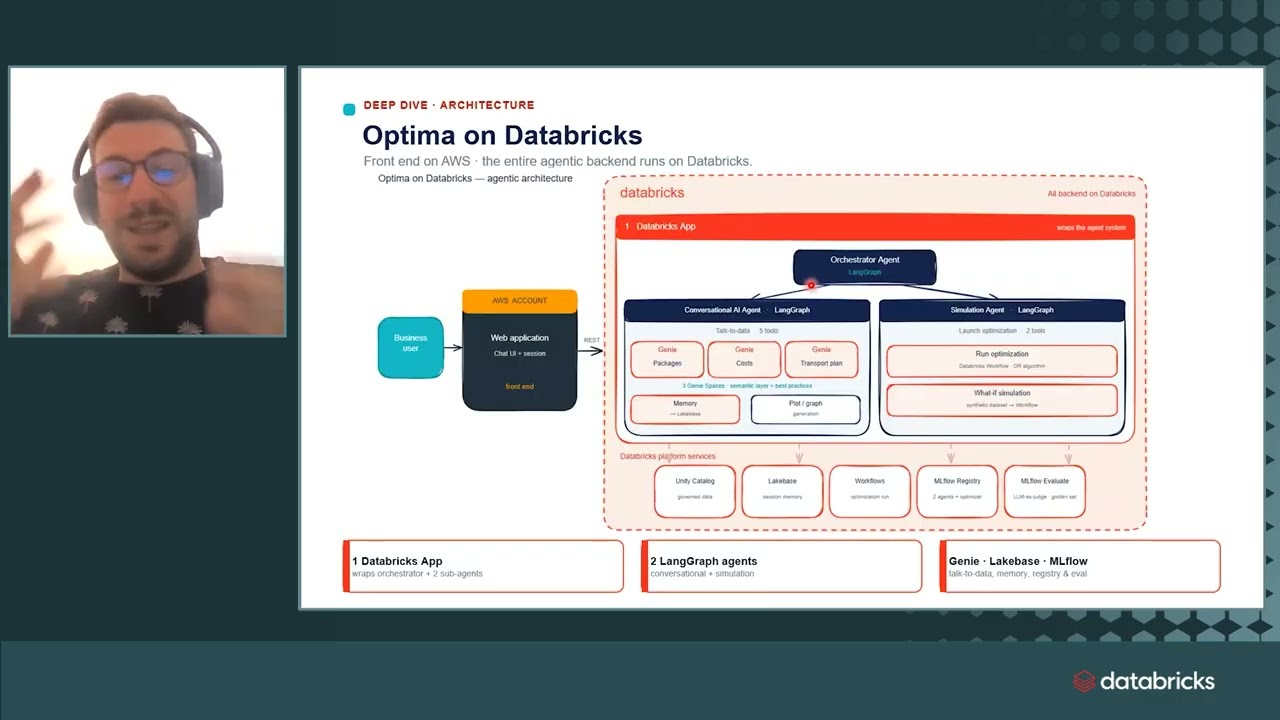
How I built agent-based security reviews on Databricks
An agent-based security review layer on Databricks automates predictable evaluations while routing ambiguous or high-risk cases to human reviewers. Built using Unity Catalog, Lakeflow Jobs, Databricks Apps, and hosted foundation models, this governed architecture improves review cycle times and consistency without removing human authority.
 News
NewsHow HSS Offloads Provider Administrative Burden with the Databricks Data + AI Platform
Hospital for Special Surgery uses the Databricks Data and AI Platform to power MD360, an application designed to eliminate administrative burdens for healthcare providers. The platform unifies enterprise data and secures information using Unity Catalog to allow clinicians to focus entirely on patient care.
How Concurrence governs clinical AI at a trillion-token scale with Unity Gateway
Concurrence scaled its clinical AI agent platform to an annualized 1.2 trillion tokens by consolidating its data and AI architecture on Databricks. The system pairs an immutable patient world model built on Delta tables and Lakebase with Unity Catalog and Unity Gateway to enforce compliance-gated model routing and continuous agent evaluation.
MLflow 2.11.5
Users can now opt in to route Unity Catalog model registry artifact uploads and downloads through the Databricks SDK Files API. This update provides an alternative transfer mechanism for managing model artifacts within Databricks environments.
This release adds support for the new Mason workspace-level service via the w.mason client. It also introduces service_credential and secret_reference fields to Unity Catalog model provider configurations.
Unity Catalog v.2.0?
Unity Catalog Pages: a governed home for your business knowledge in Genie Ontology
Unity Catalog Pages provide a governed home within Genie Ontology to define and organize key business terms, entities, and acronyms right next to the data they describe. This semantic layer grounds agents like Genie One in authoritative organizational context and can be rapidly populated from sources like Confluence, Slack, and Google Docs using Genie Code.
Unity Catalog Volume as spark checkpoint location (in 2026)
 News
NewsHow adidas Uses Databricks to Build Better Products
Adidas uses Databricks' lakehouse platform to centralize all its data—from product to football-related insights—enabling faster analytics across the organization. The company's Genie analytics tool helps analysts spend less time processing data and more time on strategic questions, ultimately supporting better product development.
Check my blog on Databricks Unity Catalog
Check my blog on Databricks Unity Catalog
Databricks pipeline started failing after moving tables to Unity Catalog — how would you debug it?
Suppose a pipeline was previously using: hive_metastore.schema.table and is migrated to: catalog.schema.table The transformation logic hasn't changed. But the pipeline now fails during execution. Possible areas to investigate: Catalog permissions Schema permissions Service principal Pipeline identity Cluster access mode External location Storage credential Table ownership Hardcoded table references The interesting part is that the SQL may be perfectly valid. How would you troubleshoot this systematically? submitted by /u/hanshu6576 [link] [comments]
Databricks pipeline works in one workspace but fails in another — where would you start?
Imagine the same pipeline and code are deployed to two Databricks workspaces. Workspace A: catalog.schema.table → Query works → Pipeline works Workspace B: catalog.schema.table → Catalog not accessible → Pipeline fails The catalog exists, the table exists, and the SQL itself is valid. Would you first investigate: Workspace-to-catalog assignment Unity Catalog permissions USE CATALOG USE SCHEMA SELECT privileges Service principal permissions External locations Storage credentials Cluster access mode SQL Warehouse identity I'm curious about the actual troubleshooting order people follow for these kinds of Unity Catalog issues. What would you check first? submitted by /u/hanshu6576 [link] [comments]
How I explain account vs workspace vs Unity Catalog metastore to new platform engineers
"Do we need a metastore per workspace?" - the answer, and why the question keeps coming up
Every new joiner on our platform team has asked some version of this, so here is the short version. You do not. The Unity Catalog metastore is created in the account console and you have one per region, linked to as many workspaces in that region as you like. Dev, test and prod attach to the same one and share a single catalog.schema.table namespace. The mental model of "each workspace has its own metastore" comes from the legacy Hive metastore, and that is exactly what Unity Catalog replaces. What actually belongs where: - Account: billing, account admins, users, groups, service principals, and the metastore itself. - Workspace: notebooks, clusters, jobs, dashboards, the place people work. - Metastore: catalogs, schemas, tables, views, volumes, and the permissions on them. Identity federation means a group is configured once at account level and assigned to workspaces, so a grant on data applies wherever that group works. Workspace-local groups still exist in non-federated workspaces, but they cannot be granted Unity Catalog permissions, which is a good reason to migrate them. Storage: metastore-level managed storage is optional, and anything already in a bucket becomes an external location with a storage credential. Drew it out as a 2-3 minute animated diagram: https://youtu.be/2yy9-BL_RDo Series in order: https://www.youtube.com/watch?v=B5iHmoYgnqY&list=PLDB5WDkDOYF4 How are you separating environments inside one regional metastore: catalog per environment, workspace-catalog bindings, or separate regions? submitted by /u/Broad-Cherry-5999 [link] [comments]
"Do we need a metastore per workspace?" - the answer, and why the question keeps coming up
This comes up constantly in real platform design, and the confusion is almost always about which layer owns what. The account is the container for the organisation, normally one per cloud provider. Billing, account admins and identities live there. A workspace is a single deployment of the UI: notebooks, clusters, jobs, dashboards. Most teams run dev, test and prod as separate workspaces. The Unity Catalog metastore is the part people place wrongly. It is created at account level, not inside a workspace, and the docs say you have one metastore per region, linked to any number of workspaces in that region. So dev, test and prod in the same region share one metastore and one catalog.schema.table namespace, instead of each keeping a separate legacy Hive metastore. Identities follow the same shape: users, groups and service principals are configured once in the account console and then assigned to workspaces, so you grant a group access to data once rather than repeating it per workspace. Storage is still yours. Metastore-level managed storage is optional, and existing buckets are registered as external locations backed by a storage credential. One line to remember it by: the account holds identities and billing, workspaces hold the tools and compute, the metastore holds the data and who can see it, shared across every workspace in the region. I drew it as a short animated diagram because the hierarchy sticks better visually (2:32): https://youtu.be/2yy9-BL_RDo Episode 3 of a series, in order here: https://www.youtube.com/watch?v=B5iHmoYgnqY&list=PLDB5WDkDOYF4 For those running dev and prod in the same region: are you isolating with separate catalogs, workspace bindings, or something else? submitted by /u/Broad-Cherry-5999 [link] [comments]
Genie Agent refuses to add scalar SQL function from Unity Catalog
 News
NewsHow Databricks Genie Automates Data Workflows with Genie Ontology and Scheduled Tasks
Databricks Genie enables ontology by default for business context and adds document/PDF uploads, direct Unity Catalog queries, and team collaboration features in chat. Scheduled tasks automate recurring workflows with embedded visualizations and PDF outputs accessible across web, desktop, and mobile platforms.
 Tutorials
Genie Agents Tutorial: Build & Customize AI Data Agents
Genie agents are AI assistants that let users query their data using natural language while inheriting context from Databricks' Unity Catalog. Data analysts can customize agent behavior through text instructions, examples, and a code assistant, then monitor and improve performance based on user queries.
 Tutorials
How to Use Genie in Google Sheets: Import & Query Data
The Databricks Genie 1 connector for Google Sheets allows users to ask natural language questions about business data in Unity Catalog and receive detailed answers with SQL queries and source attribution. Results can be imported into Google Sheets and automatically refreshed, eliminating the need to re-query for updated data.
MLflow 3.16.1
MLflow 3.16.1 removes the default basic-auth admin password from basic_auth.ini as a security fix (GHSA-gq3w-7jj3-x7gr) and adds support for span links in Unity Catalog traces. The release also fixes trace location resolution in Databricks Model Serving, includes a timeout option for the @scorer decorator, and improves web UI access control for non-admin users.
Databricks Jobs to Kubernetes Spark Jobs migration
I'm discussing some architectural changes with my data team, and one of them is about cutting costs. The idea is to migrate Databricks Jobs to Spark jobs on Kubernetes. We've done a PoC and it works well. But despite the clear cost savings, I'm getting pushback from management and they're resisting the change. Can someone explain the reason behind this? It seems clear that you pay double for running jobs in Databricks, and you could save a lot of money. Yes, doing this means we bypass Unity Catalog, but we could convert only the Bronze and Silver layers. submitted by /u/worldpwn [link] [comments]
 News
NewsAI Watermarking, Databricks AI Extract, Hugging Face, and Unity Catalog | AI Newsround - Summer 2026
Claude and other AI models will invisibly watermark generated text to ensure content traceability, while Databricks AI Extract achieves 94.7% accuracy on complex documents and extracts charts as structured data. Databricks added skills to Unity Catalog as governed assets and launched AI Gateway to centralize access to multiple AI models, enabling rapid evaluation and swapping without code changes.
Databricks architecture drawn step by step: control plane, compute plane, Delta, Unity Catalog
How energy teams turn theft detection into governed action with Genie and AI business processes
A Databricks App orchestrates the full lifecycle of energy theft detection—turning ML-flagged suspicious accounts into prioritized investigations, dispatch-ready reports, and tracked recovery workflows, with Lakebase keeping live case state and recovery totals. Genie One, Unity Catalog, Unity Gateway, and Agent Bricks tie this together on one platform, delivering trusted metrics, governed AI usage, and automated executive reporting.
Could a “Data → Agent” composer be useful for Databricks?
I've been thinking about a gap between Databricks data and agent frameworks. Databricks already has a lot of the building blocks: - Unity Catalog - Genie / Genie Agents - MCP - Vector Search - AI Gateway - Agent skills/tools - MLflow - Omnigent / Kasal And tools like Omnigent and Kasal already solve a lot of the agent orchestration/execution side. But I'm wondering about the step before that: What if a customer already has a large, curated and governed Databricks data estate — how do we turn that data estate into an agent-ready configuration without manually wiring everything together? Something like: Existing Databricks Data Estate ↓ Data-to-Agent Composer ↓ ┌────────┼─────────┐ ↓ ↓ ↓ Domains Semantics Metrics ↓ ↓ ↓ Genie MCP Skills └────────┼─────────┘ ↓ Agent Configuration ↓ Omnigent / Kasal ↓ Agent The idea wouldn't be to build another chatbot or another agent framework. It would be a Databricks-native composition/bootstrapping layer that understands an existing Unity Catalog/data estate and generates the pieces needed for agents to work with that data — domain boundaries, semantic context, approved tools, Genie configuration, MCP exposure, skills, policies, evaluation setup, etc. In other words: Kasal/Omnigent: Agent → Tools/Data Proposed layer: Data Estate → Agent I'm curious if this is already solved somewhere in the Databricks ecosystem, or if people are currently doing this manually when building enterprise data agents. Would love to hear how others are approaching the “existing data estate → production-ready data agent” problem. submitted by /u/imsuryya [link] [comments]
Feature enablement for Foundation Model Unity Catalog permissions
Built a Databricks medallion pipeline for NYC Taxi data
Been working on this as a way to get hands-on with Databricks Asset Bundles and Unity Catalog governance. It's a migration of an old on-prem NYC Taxi analytics stack (ClickHouse + Spark + Docker + Terraform) into a proper Bronze/Silver/Gold lakehouse. A few things I focused on: Auto Loader for incremental ingestion, triggered by file arrival Data quality handling that doesn't just drop bad rows — duplicates, zero-distance trips, and reversed fares go into dedicated quarantine tables instead of being silently discarded Databricks Asset Bundles for deploy/orchestration (dev + prod targets) 3 published AI/BI dashboards on top of the Gold layer (fleet ops, finance, compliance) It's intentionally small in scope — meant to demonstrate the lakehouse pattern, not be a production-scale platform. Currently only Green Taxi data; FHV comparison is planned next. Repo: https://github.com/Hamza-Bouali/NYC-DATABRICKS Would love feedback, especially on the Silver-layer data quality rules or the bundle structure open to critique. https://preview.redd.it/ej6hvzrbokph1.png?width=1667&format=png&auto=webp&s=b090b2c5165efcc83fb3f2b5c38ff6ef34c8ef48 https://preview.redd.it/rih9a5sbokph1.png?width=1879&format=png&auto=webp&s=1b85b90608e1b1273da4f8cbb4fa65d9f2c397a7 https://preview.redd.it/kjdor4sbokph1.png?width=1687&format=png&auto=webp&s=677c6194ede0cd01a8630ee98f85d11a5146b410 submitted by /u/No-Pollution-2274 [link] [comments]
Why Unity Catalog Managed Tables are recommended
Unity Catalog managed tables are the best choice you can make but do you know why? In the second episode of SuperSkills Oleksandra Bovkun and I demystify all the reasons to help you make your choice. Link to the video: https://youtu.be/Q7y8\_bSfVjQ submitted by /u/Youssef_Mrini [link] [comments]
Community BrickTalk | Real-Time Data & AI: Tripwise Demo
Hey r/Databricks ! Join us for community BrickTalk on Thursday, September 24 , focusing on real-time data streaming, AI agents, and governance using Databricks. BrickTalks is a community event series where Databricks experts share real-world use cases, demos, and practical insights for building with Data and AI, giving customers a direct line to the people behind the products. In this session, we'll walk through a live demonstration of the Tripwise Demo , featuring: Sub-Second Transactions & Streaming: Device registration into Lakebase with sub-second reads/writes, plus telemetry streaming via Zerobus through a governed Medallion architecture. AI-Generated Offers & Pricing: Generating real-time agent offers using Foundation Model APIs and scoring behavioral data for usage-based renewal pricing. Natural Language Analytics: Enabling underwriters, product managers, and marketing teams to query governed insurance data in seconds using AI/BI Dashboards and Genie. Unified Governance: Managing safety, compliance, and control end-to-end with Unity Catalog. This is a great chance to see real-world architecture in action and ask questions directly to Databricks experts. When: Thursday, September 24 9:00 AM PT 12:00 PM ET 5:00 PM BST (London) 9:30 PM IST Register here and save your spot submitted by /u/Subject_Ant1789 [link] [comments]
Unity Catalog: Pros and Cons
Apache Iceberg won the open table format war when Databricks acquired Tabular, followed by its subsequent adoption across the industry. Then, the catalog war began. In a lakehouse, storing data in object storage and using the Apache Iceberg format is only part of the story. You also need a catalog that helps lakehouse query engines like Spark, Flink, or RisingWave discover tables, manage metadata, enforce access control, and work with governed data across different systems. That is where Unity Catalog comes in. submitted by /u/Low_Brilliant_2597 [link] [comments]
This release adds new API fields across multiple Databricks services, including support for Unity Catalog image paths in AI runtime tasks, feature view sources in ML data sources, budget policies and tags in ML publishing, and a new GPU_8X_B300 compute type. These additions enable Java SDK users to access recently added Databricks platform capabilities for jobs, ML workflows, pipelines, and workspace settings management.
Manager wants us to "use AI." Thinking about an AI-driven data testing framework for DevOps promotions. Sanity check?
Although we are using genie code alot but manager wants some functionality based on AI. ( maybe that’s hood goal). Our devs hate manually writing tests, so I'm drafting an automated testing gate for DevOps promotions (Local ➔ Dev ➔ QA). Wanted review with all of you. The Proposed Architecture: 1. Extract Metadata: Pull column tags, schemas, and lineage from Databricks Unity Catalog. 2. AI-Generated Tests (Llama via ai_query ): LLM reads metadata to draft SQL data checks (nulls, types, basic business logic). 3. Persist & Cache: Save SQL rules to a table. Re-generate only when schema hashes change so bug-fix retests stay 100% deterministic. 4. Execution: Run the generated SQL on a SQL Warehouse (fast, cheap, no LLM cost per data row). 5. Alerting: Feed error logs to LLM for a 2-sentence summary and send directly to Teams via Webhook (avoiding ignored email reports). How does it sound like? Is it really worth it? Anybody using this or any other AI based functionality to make devs life easy. submitted by /u/Terrible_Mud5318 [link] [comments]
Non-deterministic ROW_NUMBER() results across Unity Catalog environments
Why External Secrets in Unity Catalog Matter
Unify your marketing data with Lakeflow Connect
Lakeflow Connect now offers native, fully managed connectors for marketing and ad platforms—including Salesforce, HubSpot, Google Ads, Meta Ads, TikTok Ads, LinkedIn Ads, Marketo, and more—landing governed data directly into Unity Catalog without any infrastructure to manage. Paired with the Ad-Genie solution accelerator, teams can turn raw ad data into a governed customer 360 and a natural-language Genie agent in just three steps.
External secrets in Unity Catalog is in Beta, and it replaces Key Vault-backed secret scopes
This is the Databricks release I have been waiting for. Unity Catalog schemas can now hold external secrets, such as Azure Key Vault, and that will change how we manage and utilize secrets in our Databricks projects. On most of our engagements the secrets of record already live in Azure Key Vault, so we wire up a Key Vault-backed secret scope and move on. It works, but it is a workspace-level object from the pre-Unity Catalog era: configured per workspace, permissions managed through a separate secret ACL API, a flat scope/key namespace, and invisible to the governance model everything else on the platform now runs on. Read more: https://www.linkedin.com/posts/cenh_databricks-azure-unitycatalog-ugcPost-7504125176993800192-W9on/?utm_source=share&utm_medium=member_desktop&rcm=ACoAABmJHrsBNAC3x3H1M58JRKoHv_l4D61n0-8 submitted by /u/Lenkz [link] [comments]
Databricks Unity Catalog Explained | Full Governance Guide (Access Contr...
submitted by /u/macxima [link] [comments]
UC secrets in Key Vault
Secrets in Unity Catalog is a great feature introduced a few weeks ago, but since then, everyone has been asking to use Azure Key Vault as a secrets backend. Thanks to rapid development, we can now link our schema to Azure Key Vault; UC will read secrets as UC secrets, and permission management will be through Unity Catalog. In that scenario, you insert/update secrets in Azure Key Vault, but read/reference and grants can go through UC. more news https://databrickster.medium.com/databricks-news-serverless-genie-code-ltap-lakeflow-61853d8e422a submitted by /u/hubert-dudek [link] [comments]
Azure AI Foundry + Databricks Architecture | Deploy Genie Agent with DAB...
Azure AI Foundry Databricks architecture, Deploy Genie Agent with DABs, Databricks Genie Agent, Azure Databricks Genie Space, how to deploy genie agent with declarative automation bundles, azure ai foundry + databricks integration, fully operating genie architecture databricks, databricks unity catalog genie agent, azure databricks bronze silver gold architecture, agent to agent nlq databricks, databricks spark python sql delta lake unity catalog, production ready genie agent deployment, databricks vector search index genie, microsoft purview databricks governance submitted by /u/macxima [link] [comments]
Any plans to make externally backed secrets in Unity Catalog enter public preview/GA?
Hi Databricks Team, Seeking your advice on the above. submitted by /u/RazzmatazzLiving1323 [link] [comments]
 News
NewsDiagnose Manufacturing OEE Issues with Genie Agents
Databricks Genie allows manufacturing teams to diagnose equipment issues through natural language questions, enabling a production manager to identify a faulty welding station and quantify its impact within five minutes without writing SQL. The demo shows how data already siloed across multiple systems becomes immediately actionable when accessed conversationally.
Actually understanding Unity Catalog Managed Tables
shutil.copy from /local_disk0 to Unity Catalog Volume hangs for hours — recommended pattern for log
Get Tuesday's version of this
Tracking Unity Catalog? The Tuesday email carries what moved across the whole ecosystem, not just this topic. Free, one-click unsubscribe.