
AI/BI Dashboards
Recent items mentioning AI/BI Dashboards across the Databricks ecosystem — releases, news, videos, and community Q&A. Updated hourly.
A single embedded AI/BI dashboard can now enforce viewer-specific row-level security using signed tokens with the __aibi_external_value parameter and IdP-linked entitlement tables, eliminating dashboard duplication 7. Across the community, practitioners are enhancing table widgets with custom HTML formatting 3 while debating the platform's readiness to displace enterprise BI standards like Power BI and Tableau 1.
Generated daily from the 7 most recent items mentioning AI/BI Dashboards. Click any [N] to jump to the source.
Is Databricks Replacing Power BI and Tableau in the Enterprise?
Why did Databricks get into the BI tooling space & what does it mean for Databricks customers using Power BI, Tableau, and other established BI tools? In this 3-min video, David Meyer (SVP @ Databicks) shares how Databricks can help both provide advance decision making capabilities and lower costs, as well as where some of the older tools fit in your stack. This was recorded in front of a live audience at the Databricks Data + AI Summit 2026. Hope you enjoy it, and would personally love to hear your stories, both where AI/BI Dashboards from Databricks has been able to take on more of your BI workloads, as well where you still find gaps that need to be addressed! submitted by /u/JosueBogran [link] [comments]
Dynamic chart titles in Databricks AI/BI
A good dashboard design practice is to always make it clear what the user is looking at by providing context for each metric. Databricks AI/BI dashboards make that easier with a simple but useful feature: you can now referencse filters and fields directly in visualization titles and descriptions using @. For example, instead of a generic title like: - Revenue by Region you can make it dynamic by referencing field - Revenue for \@region Now when someone changes the filter, the title changes with it. When a dashboard has several filters and interactions, it’s surprisingly easy to lose track of the context behind a number or chart. Having that context reflected directly in the visualization makes the dashboard feel much more intuitive. https://reddit.com/link/1wn02wy/video/gavm1gcp60rh1/player submitted by /u/szymon_dybczak [link] [comments]
5 Ways to Enhance Databricks AI/BI Dashboard Tables with HTML
Built a Databricks medallion pipeline for NYC Taxi data
Been working on this as a way to get hands-on with Databricks Asset Bundles and Unity Catalog governance. It's a migration of an old on-prem NYC Taxi analytics stack (ClickHouse + Spark + Docker + Terraform) into a proper Bronze/Silver/Gold lakehouse. A few things I focused on: Auto Loader for incremental ingestion, triggered by file arrival Data quality handling that doesn't just drop bad rows — duplicates, zero-distance trips, and reversed fares go into dedicated quarantine tables instead of being silently discarded Databricks Asset Bundles for deploy/orchestration (dev + prod targets) 3 published AI/BI dashboards on top of the Gold layer (fleet ops, finance, compliance) It's intentionally small in scope — meant to demonstrate the lakehouse pattern, not be a production-scale platform. Currently only Green Taxi data; FHV comparison is planned next. Repo: https://github.com/Hamza-Bouali/NYC-DATABRICKS Would love feedback, especially on the Silver-layer data quality rules or the bundle structure open to critique. https://preview.redd.it/ej6hvzrbokph1.png?width=1667&format=png&auto=webp&s=b090b2c5165efcc83fb3f2b5c38ff6ef34c8ef48 https://preview.redd.it/rih9a5sbokph1.png?width=1879&format=png&auto=webp&s=1b85b90608e1b1273da4f8cbb4fa65d9f2c397a7 https://preview.redd.it/kjdor4sbokph1.png?width=1687&format=png&auto=webp&s=677c6194ede0cd01a8630ee98f85d11a5146b410 submitted by /u/No-Pollution-2274 [link] [comments]
Community BrickTalk | Real-Time Data & AI: Tripwise Demo
Hey r/Databricks ! Join us for community BrickTalk on Thursday, September 24 , focusing on real-time data streaming, AI agents, and governance using Databricks. BrickTalks is a community event series where Databricks experts share real-world use cases, demos, and practical insights for building with Data and AI, giving customers a direct line to the people behind the products. In this session, we'll walk through a live demonstration of the Tripwise Demo , featuring: Sub-Second Transactions & Streaming: Device registration into Lakebase with sub-second reads/writes, plus telemetry streaming via Zerobus through a governed Medallion architecture. AI-Generated Offers & Pricing: Generating real-time agent offers using Foundation Model APIs and scoring behavioral data for usage-based renewal pricing. Natural Language Analytics: Enabling underwriters, product managers, and marketing teams to query governed insurance data in seconds using AI/BI Dashboards and Genie. Unified Governance: Managing safety, compliance, and control end-to-end with Unity Catalog. This is a great chance to see real-world architecture in action and ask questions directly to Databricks experts. When: Thursday, September 24 9:00 AM PT 12:00 PM ET 5:00 PM BST (London) 9:30 PM IST Register here and save your spot submitted by /u/Subject_Ant1789 [link] [comments]
CSV export from AI/BI Dashboard table widget does not preserve visual column order
Beyond embedding: How to secure AI/BI Dashboards for every viewer
A single AI/BI dashboard can now serve every viewer securely: one entitlements table plus the signed embed token's __aibi_external_value control row-level access per viewer, so teams avoid duplicating dashboards or repeating filters across queries. Access is driven by identity-provider group membership rather than manually maintained user lists, and the pattern layers default-deny protections—masked columns, refused tokens for unentitled viewers, and Unity Catalog row filters—for defense in depth.
AI/BI Dashboards
Custom Visualizations in Databricks AI/BI Dashboards: Build a Dumbbell Chart
Moving ~150 Tableau dashboards to Databricks AI/BI - anyone done this at scale?
We are considering moving from Tableau to Databricks AI/BI Dashboards and wanted to see if anyone here has made a similar move. We currently have around 150 Tableau dashboards used by 1,000+ users, with a mix of technical and non-technical users. Most of the underlying data already lives in Delta tables, so naturally we're looking at whether it makes sense to consolidate and use Databricks for the dashboarding layer as well. For those who have done this, how has the experience been? Anything you wish you knew before migrating? Any major limitations compared to Tableau, especially around visualization, performance, or the experience for non-technical users? I'm also curious about cost at scale. With 1,000+ users potentially hitting dashboards, did SQL warehouse usage become a concern? Would you feel comfortable replacing Tableau completely with AI/BI Dashboards today, or do you still find yourself needing Tableau for certain use cases? Would really appreciate hearing about real-world experiences. submitted by /u/Immediate_Bus5250 [link] [comments]
Attach files in Genie Code
Genie Code is getting a new feature 🥳 Good news you can attach a document to Genie Code when you need it as temporary context for the current conversation. What's a good use case? 🔴 Explain or summarize a document: “Summarize this PDF and list the key decisions.” 🔴 Extract information from PDFs, scans, or images. 🔴 Generate code based on a specification: attach a requirements document and ask Genie Code to create Python or SQL. 🔴 Analyze data files such as CSV, Excel, JSON, or JSONL. 🔴 Convert documentation into code, tests, or a notebook. 🔴 Interpret diagrams, charts, architecture sketches, or screenshots. 🔴 Migrate Tableau or Power BI files into AI/BI dashboards using /importBI. What are the supported file types ? .pdf, .csv, .xlsx, .xls, .json, .jsonl, and common image formats. submitted by /u/Youssef_Mrini [link] [comments]
How to remove/delete a Relationship Graph (Semantic Model) from an AI/BI Dashboard?
AI/BI Dashboard pivot export: Excel
Custom Visualizations in AI/BI Dashboards: Build a Pareto Chart with Vega-Lite
How to export clean values from ai/bi dashboard table that uses html formatted columns
Building Plug-ins for AI/BI Dashboard
How to limit the AI/BI dashboard sharing people-picker to workspace members
 News
NewsGenie Code Skills: Maintaining Quality at Scale
Genie Code can automatically generate a Databricks AI/BI dashboard from a simple business prompt, performing data discovery and dashboard authoring. By adding a "skill" to Genie Code, users can enforce engineering standards like bronze, silver, and gold table creation, dimensional modeling, and automated refresh jobs, making the output production-ready and repeatable.
AI/BI Dashboard Navigation: Nested Tabs, Page Structure, and Reusable Visuals
Geospatial Unbounded: Spatial SQL GA with AI/BI Maps, Delta Sharing, and Iceberg v3
Spatial SQL is now Generally Available on Databricks, bringing native geospatial data types, 90+ ST_* functions, and AI/BI Dashboards that render maps natively. This release also includes major performance improvements, open lakehouse support via Delta Sharing and Iceberg v3, and Apache Spark 4.2 compatibility for geo columns.
Metric Views in AI/BI Dashboards & Genie (Part 2 of 3)
I Finally Get Why Everyone's Excited About Databricks AI/BI Dashboards
The SDK now supports more granular AI agent detection in User-Agent headers and passes unrecognized values as-is. Several API changes introduce new fields for dashboards, apps, ML materialized features, and synced table statuses, along with a Revert method for Lakeview dashboards.
This release introduces new methods for Lakeview and Postgres services, including revert() for Lakeview and undeleteBranch() for Postgres, along with new fields across various services like Jobs and IAM. Several breaking changes require actionType and resourceId for bundle operations, cliVersion for bundle versions, and alter the tags field for Marketplace listings and pagination for cluster events.
This release introduces the new bundle package and workspace-level service, alongside a revert method for Lakeview dashboards and an undelete branch method for Postgres services. Breaking changes include modified pagination for the cluster events API and a type change for the marketplace listings request tags field to a dedicated dataclass.
Reports migration made easy through genie Code!
Genie Code now supports migrating from Tableau and PowerBI. With the new /𝒊𝒎𝒑𝒐𝒓𝒕𝑩𝑰 command, you can: → Upload a .twb, .twbx, .tds, .tdsx, or .pbit file directly → Auto-generate an AI/BI dashboard that mirrors your existing visualizations → Convert measures & dimensions into reusable metric views → Promote them to Unity Catalog for governance, lineage, and access control The migration path that used to take weeks now starts with a single command.
Databricks now supports importing Tableau and Power BI files into Genie Code to automatically build AI/BI Dashboards with Metric Views
With **Genie Code**, you can now add a Tableau or Power BI file and have it build an **AI/BI dashboard** that replicates your existing visualizations - while connecting them to **metric views** that mirror the underlying business logic. [Import BI files using Genie Code - Azure Databricks | Microsoft Learn](https://learn.microsoft.com/en-us/azure/databricks/dashboards/manage/import-bi#requirements) Many organizations have years of BI logic embedded inside workbooks, reports, templates, and semantic layers. Rebuilding that logic manually in a new platform can be slow, error-prone, and difficult to govern. This new workflow helps accelerate that migration path: 1. Upload a Tableau or Power BI file directly into Genie Code Supported formats include `.twb`, `.twbx`, `.tds`, `.tdsx`, and `.pbit`. 2. Use the `/importBI` command in Agent mode Genie Code imports the BI asset and generates an AI/BI dashboard. 3. Review the generated dashboard and metric views Measures and dimensions from the original file are transformed into metric views. 4. Promote metric views to Unity Catalog This makes them reusable across dashboards, Genie Spaces, and notebooks, while adding governance, lineage, access controls, and discoverability. Currently, there is also a 100 MB limit for direct file uploads. For larger files, the recommended path is to store the file in a Unity Catalog volume and reference it directly, for example: `/importBI @/Volumes/my_catalog/my_schema/my_volume/sales_workbook.twb`
The Top 10 Best Practices for AI/BI Dashboards Performance Optimization (Part 2)
The Top 10 Best Practices for AI/BI Dashboards Performance Optimization (Part 1)
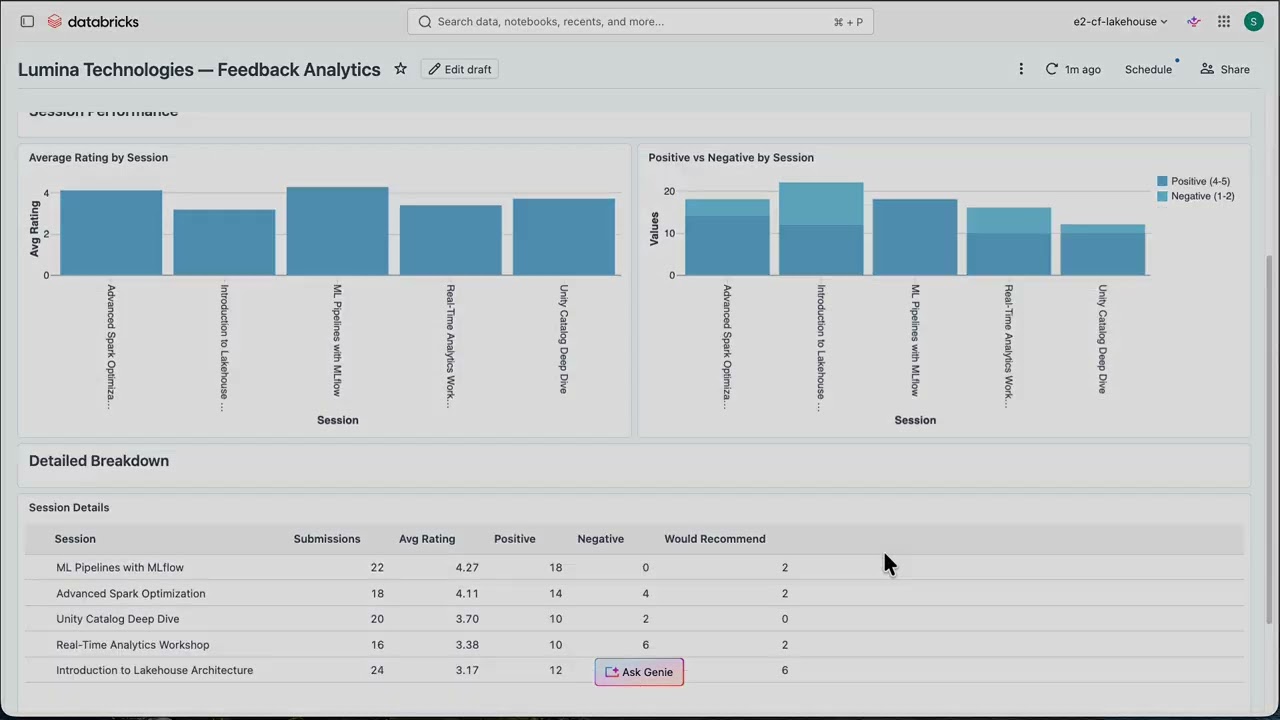 News
NewsApache Iceberg V3 on Databricks: From Ingestion to Analytics
The video demonstrates Apache Iceberg v3 on Databricks, showcasing how its new variant column type natively handles semi-structured data and how row-level concurrency enables simultaneous data ingestion and corrections. It also highlights cross-platform data accessibility from open-source Spark via the Iceberg REST catalog, ensuring no vendor lock-in.
How to programatically extract rendered or computed data from AIBI Lakeview dashboard widget via API
The question your commercial data should already be able to answer
Databricks and Veeva now embed Genie AI agents and AI/BI dashboards directly into Veeva Vault CRM, enabling life sciences commercial teams to get real-time answers to their questions without leaving their workflow. This unified Databricks lakehouse with Unity Catalog delivers governed commercial data to every persona, from sales reps to MSLs, in the format and depth their role requires.
AI/BI Dashboard refresh via DABs + Jobs executes successfully but dashboard does not update without
Claude code + AI Dev kit vs Genie code
Hi everyone, i am testing the limits for agentic engineering for databricks. Has anyone tried using claude code with AI dev kit and comparing it against Genie code? Specifically around these tasks 1) Data engineering 2) ML prototyping 3) AI/BI Dashboard building So far, claude code + AI dev kit seems to work really well. But from a conversation with claude it seems genie code out of the box is better already. Anyone have any experience?
AI/BI dashboard filter having no effect?
As seen in screenshot the Product filter is set to allow two values. But ALL values are still displayed. Why does this filter not work? Note: https://preview.redd.it/4rm0z9gxmyxg1.png?width=2092&format=png&auto=webp&s=02cc5ff480269c2e29fa7fd9d55214bb41df5121
 News
NewsStop Guessing Table Health — Let These Dashboards Tell You
Databricks offers two dashboards for monitoring table health and access: the Table Access Advisor and the Table Health Advisor. These dashboards provide insights into table ownership, read/write patterns, staleness, optimization status, and underlying file structures, helping users identify ghost tables and ensure best practices.
 Tutorials
From Excel to AI Agents: The Evolution of BI Explained
The video explains the evolution of Business Intelligence (BI) through four phases, from IT-centric to analyst-driven, then semantic layers, and finally to a future where AI agents are primary BI users. It demonstrates how Databricks' BI stack, including Dashboards, Genie (natural language interface), Metric Views (semantic layer), and Databricks One (serving layer), addresses these evolving needs by providing a unified, open, and AI-ready platform.
 News
NewsNever Build a Dashboard by Hand Again
The Databricks assistant, now called Genie code, can automatically generate multi-page dashboards from a blank canvas using natural language prompts. Users define a metric view as the data source and then describe desired dashboard pages, visuals, and themes, with Genie code planning and executing the build.
 Tutorials
Databricks AI Dev Kit Demo - Install, DataGen, SDP, Dashboard
The video demonstrates installing the Databricks AI Dev Kit on a Mac, then uses it to generate synthetic data, create serverless Spark declarative pipelines for a medallion architecture, and build a Databricks dashboard based on the generated data. It highlights how the AI Dev Kit leverages skills and an MCP server to automate these development tasks.
This release introduces new resources for managing Postgres databases, data classification catalog configurations, and knowledge assistant features. It also renames the databricks_apps_space resource to databricks_app_space.
 Tutorials
Databricks End-To-End Project | Zero-To-Expert | Streaming, AI, Lakeflow, Unity Catalog, AI/BI
This video demonstrates building an end-to-end restaurant analytics platform on Databricks, covering streaming and batch data ingestion, AI-powered sentiment analysis, and dashboard creation. It teaches how to use Unity Catalog, Lake Flow Connect for CDC, Spark declarative pipelines for real-time data from Event Hub, and how to construct a medallion architecture with fact and dimension tables.
 Tutorials
Unity Catalog Metric Views - Why you should care about Databricks' new Semantic Models
Unity Catalog Metric Views are Databricks' new semantic models, allowing users to define business-friendly names, dimensions, and context-sensitive measures for data. These views centralize KPI definitions, enabling consistent use across dashboards, AI tools, and downstream BI platforms, and are created using YAML.
The assessment workflow now includes a force-refresh parameter to rerun assessments and obtain updated results, and a new experimental workflow converts Azure WASBS URLs to the more performant ABFSS format. Dashboard management is now more resilient, automatically recreating dashboards when permission issues occur or they're trashed, and service principals are now supported as members of account groups.
 News
NewsAI/BI Dashboards - July 2025 Updates
Databricks AI BI dashboards have added several new features, including custom dashboard themes, global filters, drill-through capabilities, and file uploads. The updates also introduce automated forecasting, chloropleth map visualizations, and scheduled parameterized reports.
 Tutorials
46 AIBI Dashboards & Visualizations | Consumer Access in Databricks | Forecasting Reports
AIBI dashboards in Databricks enable users to create interactive visualizations and reports from their data using a drag-and-drop interface, with AI-assisted features like automated visualization generation and forecasting. Business users can then access and consume these published dashboards through a simplified consumer access profile that restricts permissions to viewing and refreshing only.
 Tutorials
Healthcare Interoperability: End-to-End Streaming FHIR Pipelines With Databricks & Redox
Redox streams healthcare data from EHR systems into Databricks by converting various formats (HL7, XML, X12) to FHIR JSON with normalization and connectivity handling. Databricks processes FHIR data using SQL and AI without specialized software, enabling real-time analytics and bidirectional data exchange for healthcare use cases like prior authorization.
 News
NewsData Triggers and Advanced Control Flow With Lakeflow Jobs
Databricks Lakeflow Jobs includes data triggers that automatically run pipelines when files arrive or tables update, ensuring jobs execute only when data is ready. Control flow features like for-each loops, conditionals, and repair-run enable building complex, modular pipelines with reduced costs and simpler debugging.
UCX v0.58.0 adds offline installation support for restricted-access environments and enables creation of account-level groups from nested workspace groups for improved governance. The release also enhances dashboard navigation with hyperlinks to table and cluster resources, and includes fixes for assessment exporters and improved error handling in the Workflow linter.
This release adds Databricks Runtime 16+ support, fixes cluster policies on UC-enabled workspaces, introduces HMS Federation Glue credential migration, and refactors pipeline migration from skip-pipeline-ids to include-pipeline-ids. The migration progress workflow now runs automatically daily at 5 AM UTC while improving dashboard migration tracking and Python error reporting.
 News
NewsKen Wong, Sr. Director of Product Management at Databricks on Bringing AI to Business Intelligence
Databricks launched Lakeview AI, a business intelligence platform that combines traditional no-code dashboarding with a conversational AI assistant called Genie. The system uses compound AI models and metadata integration to answer natural language queries, learn business-specific semantics from user interactions, and handle complex data contexts.
Get Tuesday's version of this
Tracking AI/BI Dashboards? The Tuesday email carries what moved across the whole ecosystem, not just this topic. Free, one-click unsubscribe.