
Asset Bundles
Recent items mentioning Asset Bundles across the Databricks ecosystem — releases, news, videos, and community Q&A. Updated hourly.
What is Asset Bundles?
Declarative Automation Bundles, formerly Databricks Asset Bundles, are the infrastructure-as-code layer for Databricks projects. You describe everything a project needs in configuration files: jobs, pipelines, dashboards, model serving endpoints, and MLflow experiments and registered models. The Databricks CLI then validates that definition and deploys the whole project to a workspace as one unit.
Bundles exist to bring ordinary software engineering practice to data and AI work. Because the entire project lives in version-controlled files, you get code review, testing, and CI/CD instead of hand-edited jobs that drift apart across workspaces. The same bundle deploys to development, staging, and production with per-target overrides, so promoting a pipeline is a deploy command rather than a rebuild by hand.
Bundles have been generally available since April 2024. The rename to Declarative Automation Bundles landed in March 2026, partly because the word assets was ambiguous on the platform. The direction since GA: resources can be defined in Python as well as YAML, bundles are editable in the workspace UI, and new bundles created with CLI 1.3.0 or later deploy through a direct engine instead of Terraform.
Why were Databricks Asset Bundles renamed?
Databricks renamed them Declarative Automation Bundles on March 16, 2026, saying the new name better reflects what bundles do and that assets meant too many different things on the platform. The change is non-breaking: the bundle CLI command still works and existing configuration needs no edits.
Are bundles generally available?
Yes. Bundles reached GA in April 2024 with Databricks CLI 0.218.0. Editing, testing, and deploying bundles from the workspace UI became generally available in October 2025.
Do I have to write YAML, or can I use Python?
YAML is the default format for bundle configuration. Python support is also generally available (since October 2025, with CLI 0.275.0), and it lets you define resources in Python and modify them programmatically during deployment.
Do bundles use Terraform under the hood?
Older bundles deploy through a Terraform-based engine, but bundles created with CLI 1.3.0 or later default to the direct deployment engine, which became generally available in June 2026. Either way you never write Terraform yourself; the CLI handles validation and deployment from your bundle files.
Sources: What are Declarative Automation Bundles?, Databricks docs · Declarative Automation Bundles feature release notes, Databricks docs · Declarative Automation Bundles FAQs, Databricks docs
Databricks CLI updates now migrate Terraform bundle deployments to the direct engine prior to execution, add cluster library configurations, and restrict Postgres snapshot schedules to YAML 2. Additionally, the Asset Bundles direct engine resolved issues causing unnecessary resource recreations, Unity Catalog grant convergence errors, and failures with Git-sourced Python tasks 6.
Generated daily from the 10 most recent items mentioning Asset Bundles. Click any [N] to jump to the source.
 News
Newsdatabricks TaskValue and Lakeflow - orchestrate using Python lists and arrays
The CLI introduces a preview image push command for the Databricks Artifact Registry, preconfigures coding assistants in serverless SSH sessions, and adds expiration flags for Postgres branch creation. In Asset Bundles, clusters now support library configurations, Terraform deployments migrate to the direct engine prior to execution, and Postgres snapshot schedules are restricted to YAML.

Databricks Usage in real world?
Hi all, I want to understand how AZure Databricks is actually being used in real world data engineering teams. For those of you working with Databricks, how do you use it in your current job? Likee, do you write most of your code in notebooks and publish those notebooks through Git? Or are you using Asset Bundles for ci/cd and deploying jobs and workflows through different environments? I’m trying to get a clear picture of how ADB is used in actual companies. Help this buddy out. TIA!!! submitted by /u/Wise_Beat_7035 [link] [comments]
Azure devops yml deployment of asset bundle
I need help on deploying asset bundles from Azure Devops. Where does the azure-pipelines.yml live, what parameters are required in the azure-pipelines.yml, does anyone have a basic example of it working as I'm completely lost in the complexity of it. Thanks. submitted by /u/GardenShedster [link] [comments]
AI Runtime commands have moved from experimental to databricks air, and SSH commands now support keeping detached background processes running after tunnel disconnect. Databricks Asset Bundles direct engine resolved multiple issues around unnecessary resource recreations, Unity Catalog grant convergence, and Git-sourced Python tasks.
Databricks CI/CD multi-repo DAB deploy
In my company we are starting with databricks and they have entrusted me with the cicd part, for now what best fits our needs is multi repo arch for the management of dab's. I would like to separate the ci from the CD and I miss a helmfile type tool that allows me to centralize in a repo all the dabs and their versions that are deployed in an environment. Do you have experience with any similar setup? On the other hand, we work with the to-be-continuous gitlab ecosystem and they don't have components for databricks either. I appreciate any comments submitted by /u/Appropriate_Tip_9580 [link] [comments]
Managing "Secret" Injection in DABs across Dev/Stage/Prod
Editor Space in Databricks
Sometimes it’s the small things that make everyday work noticeably better 😀 Databricks recently introduced Spaces for organizing notebooks and other workspace content - and it immediately reminded me of organizing tabs in a browser. As someone who always has way too many tabs open, having a simple way to group related work and keep things organized can make a real difference. With Spaces, you can: save and restore your open tabs keep each space anchored to a specific folder scope the file browser and search to that folder move open tabs into an existing or new space quickly switch between different work contexts create dedicated spaces for pipelines, Declarative Automation Bundles, and Git folders name, color, and pin spaces so they’re easy to recognize Organize your work with spaces - Azure Databricks | Microsoft Learn https://reddit.com/link/1wioox7/video/v79baqqgp1qh1/player submitted by /u/szymon_dybczak [link] [comments]
Built a Databricks medallion pipeline for NYC Taxi data
Been working on this as a way to get hands-on with Databricks Asset Bundles and Unity Catalog governance. It's a migration of an old on-prem NYC Taxi analytics stack (ClickHouse + Spark + Docker + Terraform) into a proper Bronze/Silver/Gold lakehouse. A few things I focused on: Auto Loader for incremental ingestion, triggered by file arrival Data quality handling that doesn't just drop bad rows — duplicates, zero-distance trips, and reversed fares go into dedicated quarantine tables instead of being silently discarded Databricks Asset Bundles for deploy/orchestration (dev + prod targets) 3 published AI/BI dashboards on top of the Gold layer (fleet ops, finance, compliance) It's intentionally small in scope — meant to demonstrate the lakehouse pattern, not be a production-scale platform. Currently only Green Taxi data; FHV comparison is planned next. Repo: https://github.com/Hamza-Bouali/NYC-DATABRICKS Would love feedback, especially on the Silver-layer data quality rules or the bundle structure open to critique. https://preview.redd.it/ej6hvzrbokph1.png?width=1667&format=png&auto=webp&s=b090b2c5165efcc83fb3f2b5c38ff6ef34c8ef48 https://preview.redd.it/rih9a5sbokph1.png?width=1879&format=png&auto=webp&s=1b85b90608e1b1273da4f8cbb4fa65d9f2c397a7 https://preview.redd.it/kjdor4sbokph1.png?width=1687&format=png&auto=webp&s=677c6194ede0cd01a8630ee98f85d11a5146b410 submitted by /u/No-Pollution-2274 [link] [comments]
Azure AI Foundry + Databricks Architecture | Deploy Genie Agent with DAB...
Azure AI Foundry Databricks architecture, Deploy Genie Agent with DABs, Databricks Genie Agent, Azure Databricks Genie Space, how to deploy genie agent with declarative automation bundles, azure ai foundry + databricks integration, fully operating genie architecture databricks, databricks unity catalog genie agent, azure databricks bronze silver gold architecture, agent to agent nlq databricks, databricks spark python sql delta lake unity catalog, production ready genie agent deployment, databricks vector search index genie, microsoft purview databricks governance submitted by /u/macxima [link] [comments]
Databricks Asset Bundles: How to manage dependencies between volumes/files and cluster creation?
How to organize your notebook tabs?
It was a real pain, but now, with a few tricks, you can manage them better. First, in Workspace files, next to the DABs folder or git repo, there is a small shortcut to show only tabs from that DABs folder or git repo. Alternatively, you can also use the switcher in Home next to Notebook. If you need to organize your tabs differently, there is new functionality: spaces, which let you group them however you like. more news https://medium.com/databrickscommunity/databricks-news-serverless-genie-code-ltap-lakeflow-61853d8e422a submitted by /u/hubert-dudek [link] [comments]
Using Databricks Asset Bundles and Lakeflow Jobs in a Real Project
Databricks Asset Bundles introduces PyDABs catalog support, updates default templates to Databricks Runtime 16.4, and adds validation checks before completing migrations to the direct engine. The release also fixes several direct deployment engine update bugs and improves Python fallback handling during local environment setup.
Managing Databricks Genie Agents as Code with Databricks Declarative Automation Bundles (DAB)

UI to DABs sync
When working from the web experience in development mode with source-linked deployment set to true (the default for development mode), you can edit jobs and pipelines in the UI, and changes are automatically propagated to your YML files. So it is like the best of two worlds: ow-code and IaC. Please remember to review any changes in Git, especially non-UI elements such as variables or mutators. Whole talk with audio https://www.databricks.com/dataaisummit/session/dabs-do-pro-all-best-tips-and-tricks submitted by /u/hubert-dudek [link] [comments]
 News
News136: Declarative Automation Bundles| Part 3 | Demo
This video demonstrates how to build, deploy, and manage a retail sales pipeline project using Databricks Asset Bundles. It covers installing the Databricks CLI, configuring authentication, validating projects, and using commands to deploy, run, and destroy bundles across different environments.
Databricks Asset Bundles now correctly handles app updates during bundle deployment when an active deployment already exists. It also fixes reference resolution and deployment failures for resource keys starting with an underscore.
What's new and what's next in DABs
What's new and what's next in DABs
Direct mode is GA and is now the default for bundles created from the workspace (since 13th August 2026); it will become the general CLI default on 26th August 2026. Let's see what direct mode brings and what will come next. https://medium.com/databrickscommunity/dabs-go-direct-ga-faster-better-and-life-after-terraform-edc502d54378 https://www.sunnydata.ai/blog/databricks-dabs-direct-mode-ga submitted by /u/hubert-dudek [link] [comments]
Bundles automatically migrate from Terraform state to the direct engine on clean deploys (opt-out via engine: terraform), and SSH sessions stay connected during idle periods with automatic keepalives every 30 seconds. Direct engine bundle operations now correctly handle removed configuration fields, support cluster policies resources, and include a DATABRICKS_BUNDLE_RESOURCE_MAX_WAIT timeout setting.
Declarative Automation Bundle: Bind an Existing Lakeflow Job
Declarative Automation Bundle - How to handle Managed resources?
Unity Catalog Schemas in Declarative Automation Bundles Are a Footgun
Productionizing Databricks Pipelines with Declarative Automation Bundles and Azure DevOps
Databricks Asset Bundles now report detailed resource action summaries and file sync counts during deploy and destroy operations, alongside fixes for workspace Git folder metadata and state migration. The CLI now enables FIPS 140-3 compliance by default for TLS connections, adds Goose support to aitools, and automatically resolves conflicting databricks-connect pins in local environment setups.
Unity Catalog Secrets - storage location for catalog.schema.secret
Read the announcement regarding Databricks Unity Catalog and how secrets can now be stored under a schema as opposed to using secret scopes backed by a secrets manager e.g. Azure Key Vault. Does anyone know if the secrets are stored in plaintext in bundle state if using the direct deployment engine mode for DABs? submitted by /u/RazzmatazzLiving1323 [link] [comments]
DABs Migration Guide: Terraform to the Direct Deployment Engine
Visual, step-by-step curriculum for mastering DABs and Infrastructure as Code
 News
NewsDatabricks News: ZeroOps, DABs, Indexes, Genie, sandboxes, migration from PowerBI, secrets
Zero Ops automatically detects errors in jobs and data quality with lineage analysis and proposes code fixes, while DABs now default to direct mode instead of Terraform with automatic state migration. Full-text search indexes deliver 400x faster queries on billion-row tables, Genie automatically converts PowerBI dashboards to Databricks metric views, and Unity Catalog secrets support granular read and reference-only permissions.
Monorepo vs Multi-repo for Databricks Asset Bundles: A Decision Framework
DABs: immutable_folder

Genie Spaces (Agents) in DABs
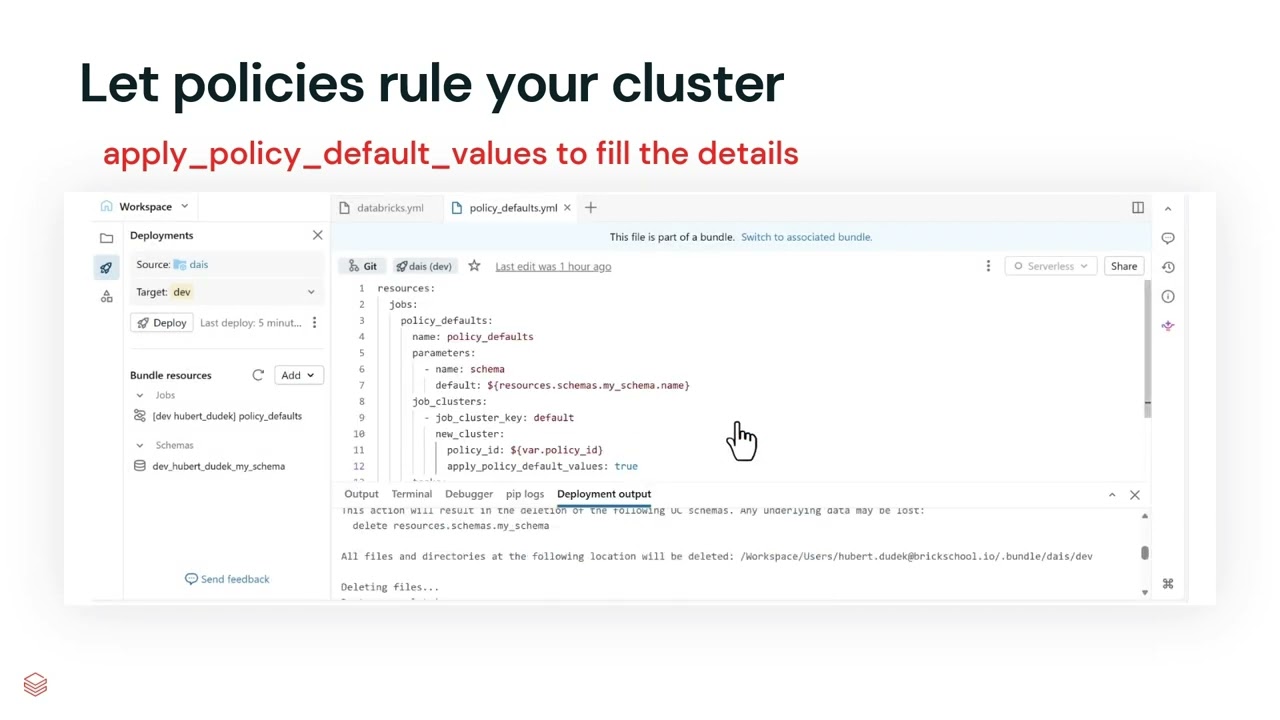
can i deploy a metric view using DABs
The databricks genie ask command is now stable (promoted from experimental), enabling practitioners to ask natural-language questions about their data directly from the CLI. Multiple reliability and usability improvements ship, including auth profile validation timeouts, fixes for GCS-backed UC Volumes deletion, bundle validation for sql_warehouse configurations, opt-in spark_python_task file downloads in bundle generation, and instance_pools resource support in Declarative Automation Bundles.
 News
NewsDatabricks News: RT Lakehouse (Reyden), Lakebase, TTL
This video highlights recent Databricks updates, including the beta release of the high-performance "Raiden" real-time lakehouse engine and new lakeflow connectors. It also demonstrates administrative changes to user groups, new time data types, predictive optimization TTL deletes, user home volumes, and advanced search capabilities in Lakebase.
How to Deploy Lakehouse Federation Using DABs from the Dev Environment to the Stage Environment
Databricks News: CLI v1.0.0, AI-tools, Docker, DABs UI sync, mutators
Databricks News: CLI v1.0.0, AI-tools, Docker, DABs UI sync, mutators


Learning Series | Automated Deployment with Declarative Automation Bundles
 Tutorials
135: Declarative Automation Bundles (Formerly Databricks Asset Bundles)| Part 2 | Sample Project
The video demonstrates how to develop a project using Databrics Asset Bundles to automate a medallion architecture data pipeline. It reviews the required project structure, including the main databrickscfg.yaml file, a job configuration file, and three Python notebooks for the bronze, silver, and gold layers.
 News
News134: Declarative Automation Bundles (Formerly Databricks Asset Bundles)|Part 1|Complete Introduction
Declarative automation bundles, formerly known as Databricks asset bundles, combine code and infrastructure definition into a single version-controlled package to eliminate manual UI operations and workspace drift. The video teaches the core concepts, project structure, configuration files, and development lifecycle of this feature to enable repeatable multi-environment deployments.
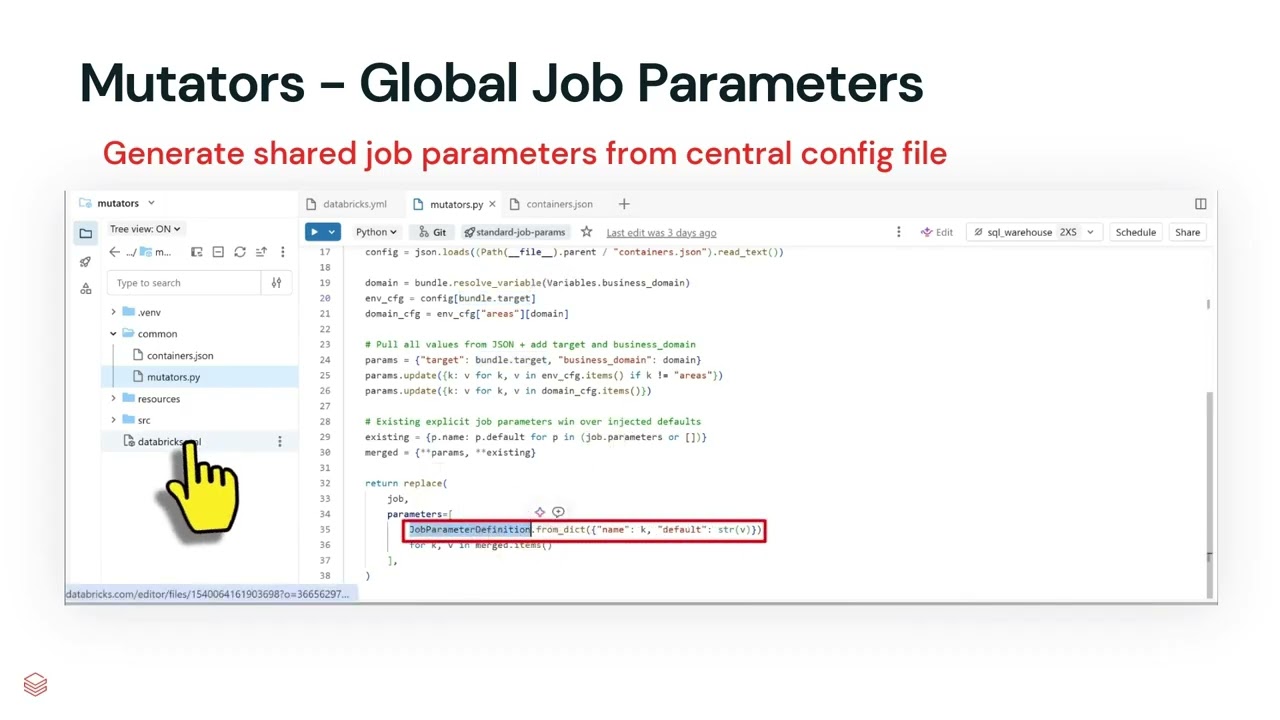
Granular Usage Attribution for dbt Pipelines with Query Tags
Databricks now supports granular usage attribution for dbt pipelines using query tags, allowing you to track costs and compute time by team, cost center, project, and environment without modifying SQL models. A reference project with a dbt pipeline, analytics dashboard, and scheduled job is available via Declarative Automation Bundles for easy deployment.

Asset Bundles Setup
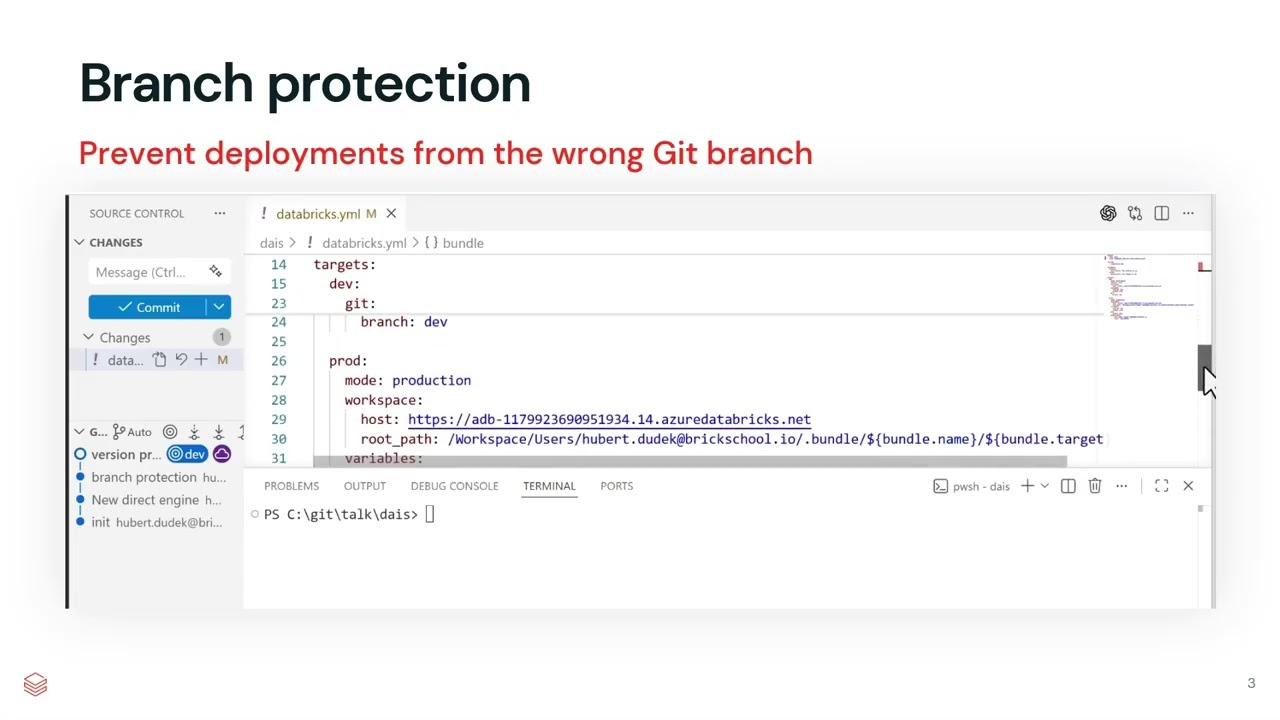
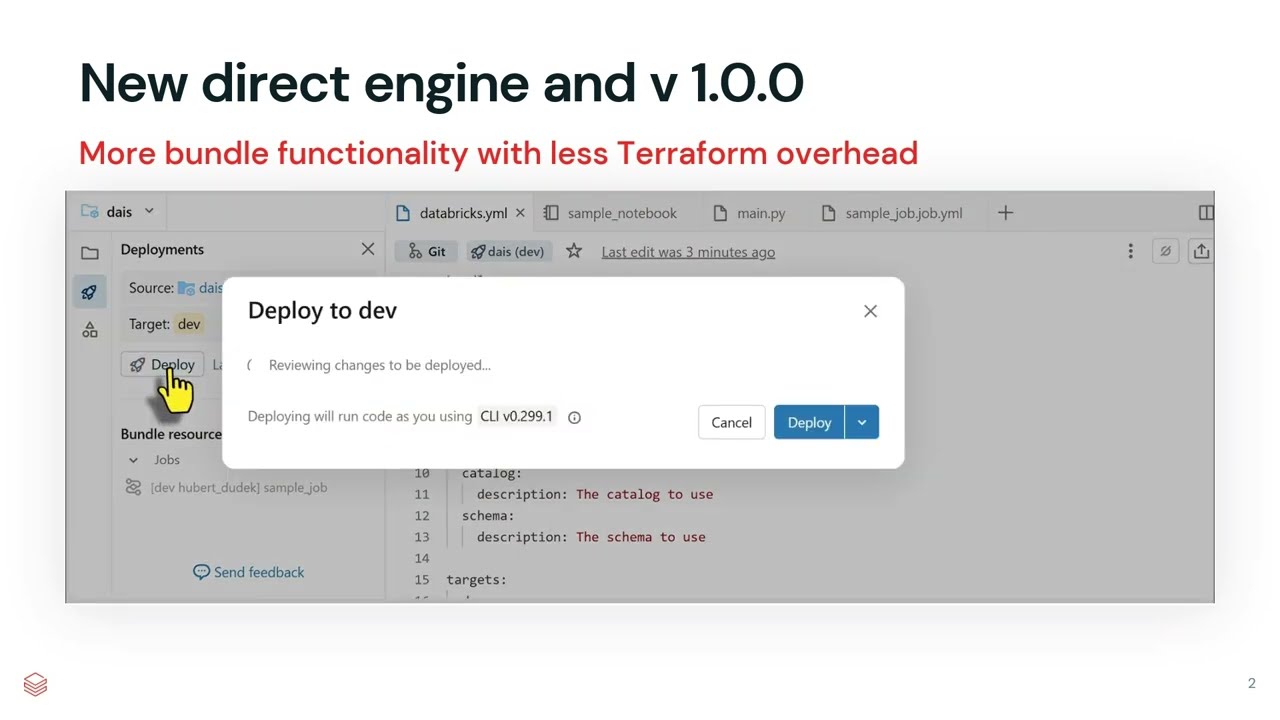
 Events
Databricks News: CLI v 1.0.0, AI-tools, databricks Docker, DABs UI sync, mutators
The video demonstrates new Databricks features, including the GA release of CLI 1.0.0, UI sync for DABs, Python mutators for bundle extension, and new Docker image options for custom runtimes. It also covers serverless pipeline orchestration, enhanced autoscaling for Lakebase and apps, serverless interactive execution timeout, and auto-scoping for access tokens.
UI sync back to DABs
Databricks Asset Bundles now includes a select flag in the direct deployment engine to plan and deploy specific resource subsets, along with support for Terraform references and automatic transient HTTP retries. The experimental open command expands to support additional workspace resources such as volumes and vector search endpoints, while notebook task paths now correctly preserve Lakeflow Designer files.
Bring Databricks into Kiro IDE with the AI Dev Kit Power
The Databricks AI Dev Kit Power now offers a one-click setup to integrate Kiro IDE with the full Databricks platform, providing AI-assisted development grounded in your workspace's Unity Catalog metadata. This new path, alongside a lighter PAT-based option, ensures your AI assistant writes SQL with actual columns and respects all row, column, and tag-based grants.
Get Tuesday's version of this
Tracking Asset Bundles? The Tuesday email carries what moved across the whole ecosystem, not just this topic. Free, one-click unsubscribe.